
Designing a logo is one of those steps in the branding adventure that feels both exciting and a bit overwhelming. Having the right tools can make it a whole lot easier and a lot more fun. With AI powered logo design platforms now everywhere, it’s possible to create eye-catching, professional logos without needing much graphic design experience at all. In this article, I’m sharing my full step by step guide for designing your logo with AI tools, including practical tips, real examples, and cool features you’ll want to check out.
Why Design Your Logo With AI Tools?
Logos are the face of any brand, and getting yours right can impact how customers see everything you do. AI tools for logo design have really changed the game. They save time, cut down on costs, and offer up a massive range of styles and ideas that you may not have thought of yourself. Whether you’re starting a small business, personal brand, or launching a new product, these platforms open up design options that were once only available to big budget companies.
AI powered tools let you create custom logos by answering a few questions about your style, industry, and color preferences. Then, within seconds, you get tons of modern, scalable logo options that work well for websites, business cards, social media, and more. The whole process is much less intimidating compared to hiring a designer or messing around with complicated design software. Plus, AI logo tools like DsgnPop, found inside WealthyAffiliate, even let you try things for free while exploring a full AI suite and community training. That’s actually how I first started exploring logo design myself.
Getting Familiar With AI Logo Design Platforms
If you’re totally new to AI design platforms, you’re not alone. At first glance, these tools can look super high tech, but they’re made to be userfriendly. Here’s how most of them work:
- Personalized Questions: Most logo generators like DsgnPop ask for your company name, slogan (optional), industry type, and some basic preferences for style or colors. You don’t need to prepare anything complicated—a draft idea or inspiration is just fine.
- Logo Generation: Once you put in your info, the platform generates several logo concepts for you. These range from minimal to bold and playful to sophisticated. Editing is usually simple, with drag and drop tools and easy tweak options.
- Instant Previews: Preview how the logo would look on different branding materials like t-shirts, packaging, or websites to see if it matches your vision.
- Download & Rights: Once you’re satisfied, you can save and download a high resolution logo file. Platforms like DsgnPop provide these with broad usage rights, which means you can confidently use your logo anywhere you like.
You don’t need a design background or any fancy tools. Just bring your creativity and let the software do the heavy lifting.
Step by Step Guide: Creating Your Logo With AI
Here’s my go to process for designing a brand logo using DsgnPop on WealthyAffiliate. Even if you’re using a different AI tool, these steps apply across the board.
- Sign Up For a Free Account
Head to WealthyAffiliate and sign up for a free account to access DsgnPop and their full suite of design tools. The platform walks you through registration, so you’ll be set up and ready to design in minutes. - Answer Branding Questions
Describe your business, input your company name, tagline (if you want), and select the general vibe—are you after something modern, classic, playful, bold, or elegant? This helps the AI brainstorm ideas in a direction you’ll like. - Pick Your Favorite Designs
The platform will show you a bunch of logo options. Take a look and shortlist your favorites. Look for styles, colors, and icons that match what your business is about. - Customize Your Logo
Editing is super flexible. You can swap out icons, change colors, try new fonts, or move elements around until you’re happy. Try a few variations—you might be surprised by what stands out! - Preview On Real World Materials
DsgnPop and other AI platforms let you see your logo on business cards, t-shirts, letterheads, digital banners, or even stickers. This step is really helpful to test readability and vibe before finalizing your choice. - Download and Safe Keep Your Files
Once you pick your winning logo design, download the high resolution version. Keep backup copies, and consider downloading extra file sizes or formats if you plan to use your logo in various locations.
With these steps, you’ve got a professional grade logo designed in less time than it’d take to even get a quote from many agencies.
Tips for Getting the Most Out of AI Logo Creators
AI logo tools are packed with options, but it can be easy to get lost or start second guessing your choices. Here’s what’s helped me and other new business owners:
- Clarify Your Brand’s Vibe: Before you jump in, jot down some adjectives that best describe your brand—confident, friendly, techy, traditional, etc. The clearer your self image is, the closer your logo will match it.
- Less Is More: The most memorable logos are usually pretty simple. If you find yourself adding too many colors, icons, or fonts, step back and simplify.
- Make It Versatile: Your logo should look great small (website favicons) and big (signage or posters). Check how it looks in black and white and on both dark and light backgrounds.
- Get Feedback: Show your options to a few trusted friends or business contacts. Sometimes a fresh pair of eyes spots details you miss.
- Save All Your Drafts: Platforms like DsgnPop let you save versions as you go. Sometimes an early draft turns out to be the winning pick after you see it side by side with others.
Don’t overthink. AI tools are made to help you move quickly, and you can always tweak things as your business grows. When you keep it simple and tuned to your unique style, you’ll be surprised how fast you spot the right fit for your brand.
Common Challenges with AI Logo Design, and How to Handle Them
Even with super intuitive platforms, there are a few bumps I’ve noticed (and heard from others), especially when starting out:
- Too Many Choices: AI can generate hundreds of variations. I narrow it down first by theme, then by color, and finally by icon style. Comparing in batches keeps the choices more manageable.
- Matching Your Brand: Sometimes the premade icons or fonts miss the exact message you have in mind. Don’t be afraid to dig into customization, swap out elements until it lines up perfectly.
- Unique Feel: Since AI platforms use shared icon libraries, some logos can look alike. Change up the colors, add unique shapes, or combine elements for a one of a kind touch.
Taking your time and experimenting is a big help. Platforms like DsgnPop make it easy to go back and redo sections if you change your mind. If you ever get stuck, check in with the community or step back for feedback, and return with fresh eyes.
Real Life Example: Using DsgnPop On WealthyAffiliate
I was creating this brand (Thrive With Kyle) and I went to DsgnPop as it is my personal “go to” tool for all of my AI needs. I described the brand, picked cheerful colors and a playful font, and got a helpful set of options to start with.
Within 60 seconds, I had a logo ready to go for my website. I tested 3 different iterations, and I finally decided on one of these 3.
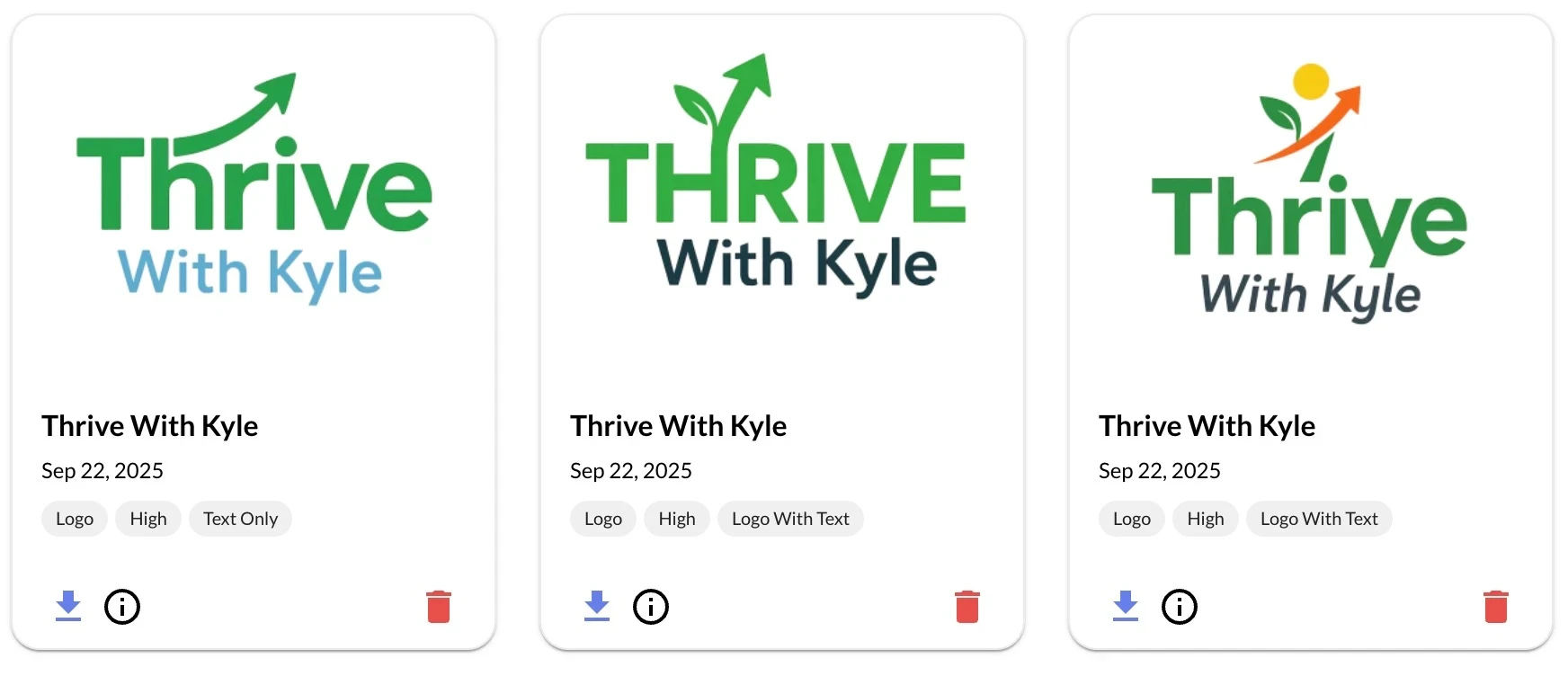
This is something that would have taken “days” to accomplish in the past, and sometimes $1,000’s to complete, and this is included with the tools at Wealthy Affiliate. You can get started for FREE!
Popular Uses For AI Created Logos
- Website and Storefront: Clean logos up front build instant recognition for online shops or blogs.
- Social Media Profiles: Scalable icons work well as avatars and cover images on platforms like Instagram, Facebook, and LinkedIn.
- Product Packaging: Print friendly logo files translate easily to stickers, boxes, and tags.
- Business Materials: Letterheads, email signatures, and business cards all feel more polished with a matching logo.
AI tools make it easy to adjust file sizes or crop versions for each use case, so you don’t have to go back to square one every time you add a new brand asset. They’re especially handy for new business owners who want to get the most out of their logos without having to hire designers for every tweak. Need a rectangular banner for your website? Or maybe just a favicon or circular avatar? These platforms can generate different layouts and resolutions from your original design.
Frequently Asked Questions
Here are a few of the most common questions I get about designing logos with AI:
Question: Are AI logos really unique?
Answer: If you spend a bit of time customizing, yes. While some base icons repeat, tweaking colors, fonts, and layouts creates something distinctive enough for most small businesses. You can add even more uniqueness by uploading your own symbols or combining several icons to get the right look.
Question: Do I need any design experience?
Answer: Nope! Platforms like DsgnPop are built for beginners and guide you through with tips at each stage. You can always learn more design tricks with the training included inside WealthyAffiliate as you go along. If you want to check out advanced techniques, their lessons help you jumpstart your creativity!
Question: Can I use my logo commercially?
Answer: Most AI logo platforms let you use your downloads anywhere, including ads, merch, and your website. Just check before putting your logo everywhere, but with DsgnPop on WealthyAffiliate, you’re good for business use. Print, sell, and market with confidence!
Giving AI Logo Design Tools a Try
AI powered platforms make logo design way more accessible, efficient, and fun, especially for people without a design background. DsgnPop inside WealthyAffiliate stands out because you can try it free and unlock other branding and business building tools at the same time. Having a supportive community and extra training makes the adventure smoother if you want to keep leveling up your business branding down the road.
Start your design ride now, check out DsgnPop for free, and see your brand come to life with a logo that feels truly your own. Don’t wait to make a memorable first impression for your business! Because when you take this step, you can set yourself up for success and stand out in your market.
Get started here: Create your free DsgnPop & WealthyAffiliate account